
Azure Red Hat OpenShift (ARO) – Architecture overview
1. Azure Red Hat OpenShift (ARO)
What is OpenShift
To read more about what OpenShift is, please check my article: Red Hat OpenShift — The Basics.
Enterprise-ready Platform-as-a-Service (PaaS) Kubernetes, and an Internal Development Platform (IDP), hosted in Azure.
What is Azure RedHat OpenShift (ARO)
Azure Red Hat OpenShift (ARO) is a fully managed, enterprise-grade Kubernetes platform jointly developed, operated, and supported by Red Hat and Microsoft on the Azure cloud. It allows you to deploy fully managed OpenShift clusters without the complexity of building, maintaining, or securing the underlying infrastructure. This means you get a seamless experience with integrated support from both vendors.
Core Features and Benefits
- Fully Managed Service: Red Hat and Microsoft handle the installation, scaling, security, monitoring, and updating of both control plane and worker nodes. This means there are no virtual machines for you to manage, and patching is automated, ensuring your clusters remain secure and up-to-date.
- Joint Engineering and Support: A dedicated Site Reliability Engineering (SRE) team from Red Hat and Microsoft works together to ensure high availability and resilience of your clusters.
- Seamless Integration with Azure: ARO is directly integrated with Azure’s ecosystem, allowing your OpenShift applications to connect easily to Azure services like Azure Cosmos DB, Azure PostgreSQL, Azure Redis, and more. It is billed directly through your Azure subscription, simplifying cost management.
- Developer Productivity: ARO provides a cloud-native, self-service platform with built-in CI/CD pipelines, enabling developers to quickly build, test, and deploy applications without worrying about the underlying infrastructure.
- Automated Scaling and Configuration: The platform allows you to start with a small, highly available cluster of three worker nodes and scale up based on application demand. This can include standard, high-memory, or high-CPU worker nodes for more flexibility.
- Enterprise-Grade Security and Compliance: ARO enforces security best practices by default, with automated updates, integrated monitoring, and compliance controls, making it suitable for running sensitive or regulated workloads.
ARO vs Kubernetes
Azure Red Hat OpenShift builds upon Kubernetes with a complete, enterprise-ready platform. Unlike basic Kubernetes, it includes pre-integrated components: container management, automation, networking, CI/CD, monitoring, registry, and authentication — all tested together. Azure Red Hat OpenShift provides fully managed operations with automated upgrades, enhanced security, integrated developer tools, and simplified management through the Azure portal with unified billing and support.
While Kubernetes is considered as CaaS (Container as a Service), OpenShift and ARO fall under the category PaaS (Platform as a Service).
OpenShift (Self-Managed) vs. ARO
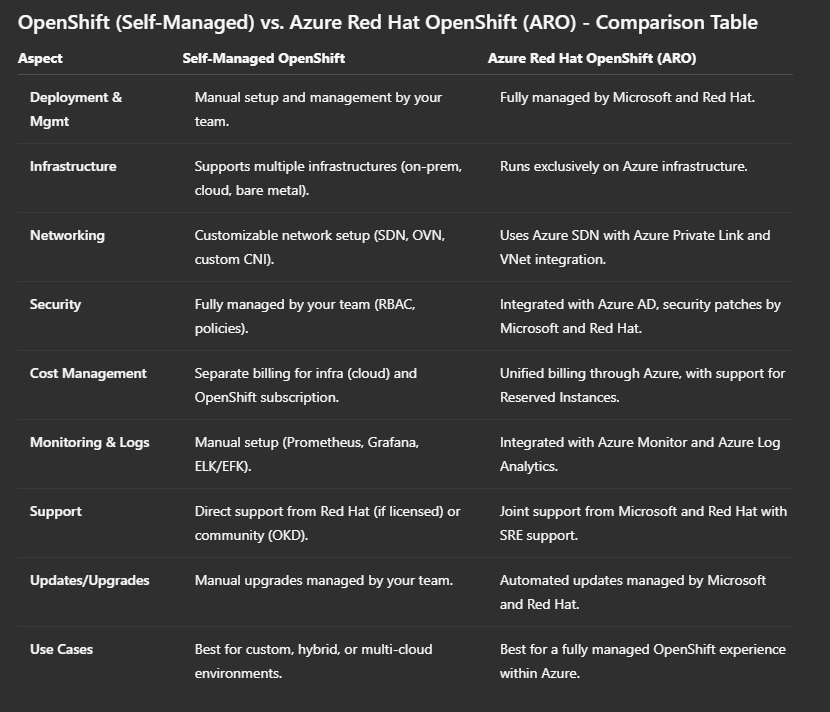
OpenShift offers two primary deployment models: Self-Managed OpenShift, where organizations take full control of installation, updates, and management on any supported infrastructure, and Azure Red Hat OpenShift (ARO), a fully managed solution jointly operated by Microsoft and Red Hat, running exclusively on Azure. The table below provides a clear, side-by-side comparison of these two approaches, highlighting differences in management, infrastructure, networking, security, cost, support, and more.
2. ARO Architecture
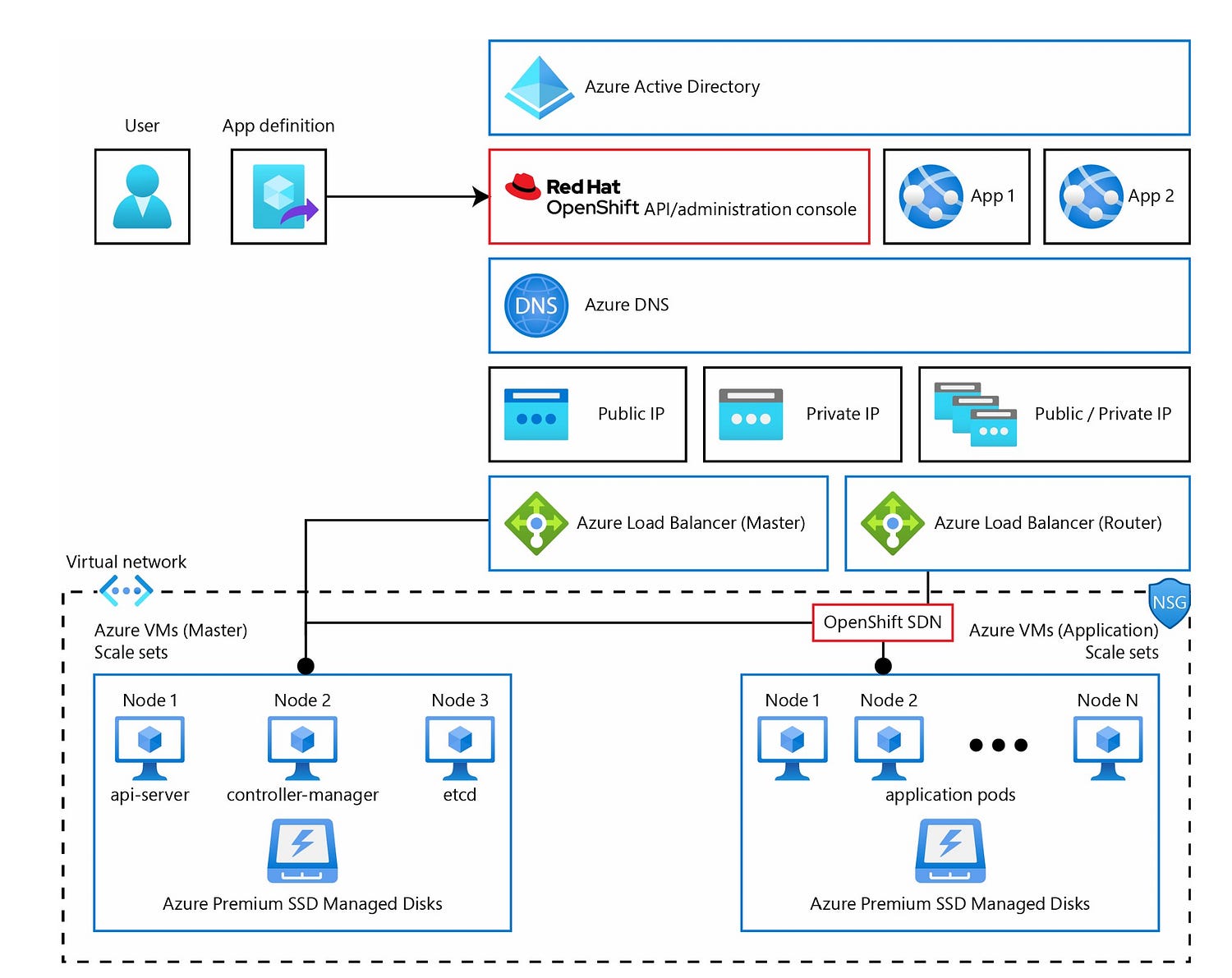
ARO is built on Azure infrastructure services, including virtual machines, network security groups, and storage accounts, all deployed directly into your Azure subscription. This integration allows for seamless connectivity with other Azure services.
Core Components
- Operating System: Runs on Red Hat Enterprise Linux CoreOS (RHCOS), providing a secure, immutable OS optimized for running containers.
- Kubernetes Cluster Components: kubelet service, etcd, etc.
Node Types
Control Nodes: API Server, Controller Manager, Scheduler, etcd.
Worker Nodes: kubelet, CRI-O (container runtime), and a networking proxy (OVN-Kubernetes).
Infrastructure Nodes: Not currently supported in Azure Red Hat OpenShift 4.x. Only control and worker nodes are used.
Networking
Uses a single Azure Virtual Network (VNet) with two subnets: one for control plane nodes and one for worker nodes.
Azure Load Balancers:
- Master Load Balancer: Manages API access for cluster control.
- Router Load Balancer: Directs traffic to applications (Ingress).
- Software-Defined Networking (SDN): Provided by Open Virtual Network (OVN-Kubernetes) on top of the Azure VNet.
Storage
- Nodes use Azure Disks, typically with 1 TB capacity, to ensure high-performance storage for critical components like etcd, where storage IOPS are tied to disk size.
ARO Architecture overview
- It combines the flexibility of Azure’s scalable infrastructure with the power of Red Hat OpenShift’s container management and security.
- Automated maintenance, scaling, and security are managed by Red Hat and Microsoft, making it a fully managed, highly available solution.
Integration with other Azure services
As a native Azure service, Azure Red Hat OpenShift (ARO) seamlessly integrates with a wide range of Azure services, providing a unified cloud-native experience. This allows you to enhance your OpenShift applications with Azure’s powerful capabilities.

Common Azure Integrations
- Compute and Scaling: Azure Virtual Machines, Azure VM Scale Sets.
- Networking: Azure Virtual Network (VNet), Azure Load Balancers, Azure Private Link for secure connectivity.
- Storage: Azure Disks, Azure Files, Azure Blob Storage for persistent data.
- Database Services: Azure SQL Database, Azure Cosmos DB, Azure PostgreSQL, and MySQL.
- Monitoring and Logging: Azure Monitor, Azure Log Analytics, and Azure Application Insights.
- Security: Entra ID (Azure Active Directory) for authentication, Azure Key Vault for secrets management.
- Machine Learning and AI: Azure Machine Learning, Cognitive Services.
- Integration and Messaging: Azure Service Bus, Event Hubs, Azure API Management.
Application Integration with Azure Services
Using the Azure Service Operator, OpenShift applications can directly create and manage Azure services as Kubernetes resources. This means developers can deploy and configure Azure services (like databases or storage) directly from within their OpenShift cluster.
Azure Red Hat OpenShift (ARO) landing zone accelerator
The Azure Red Hat OpenShift Landing Zone Accelerator is a set of best practices, design guidelines, and pre-built templates that help you quickly deploy and configure secure, scalable ARO clusters in your Azure environment.
- Strategic Design Path: Provides architectural guidance aligned with the Azure Cloud Adoption Framework.
- Target Technical State: Establishes a scalable and secure ARO environment following best practices.
- Customization: Since it is open-source, you can adapt the templates to fit your organization’s specific requirements.

More about the ARO Landing Zone in a further article!
3. ARO Management
In Azure Red Hat OpenShift (ARO), everything from the Azure data center infrastructure up to the cluster operators (including the control plane, monitoring, updates, and health management) is fully managed by Microsoft and Red Hat. This ensures high availability, security, and performance.
Your Responsibilities as a Customer
- You have full cluster-admin access, which means you can deploy and manage applications and configurations within the cluster.
- You are responsible for application deployment, scaling, security policies, and any custom configurations you make.
- You can follow the ARO Support Policy to understand the boundaries of support and avoid making unsupported changes.
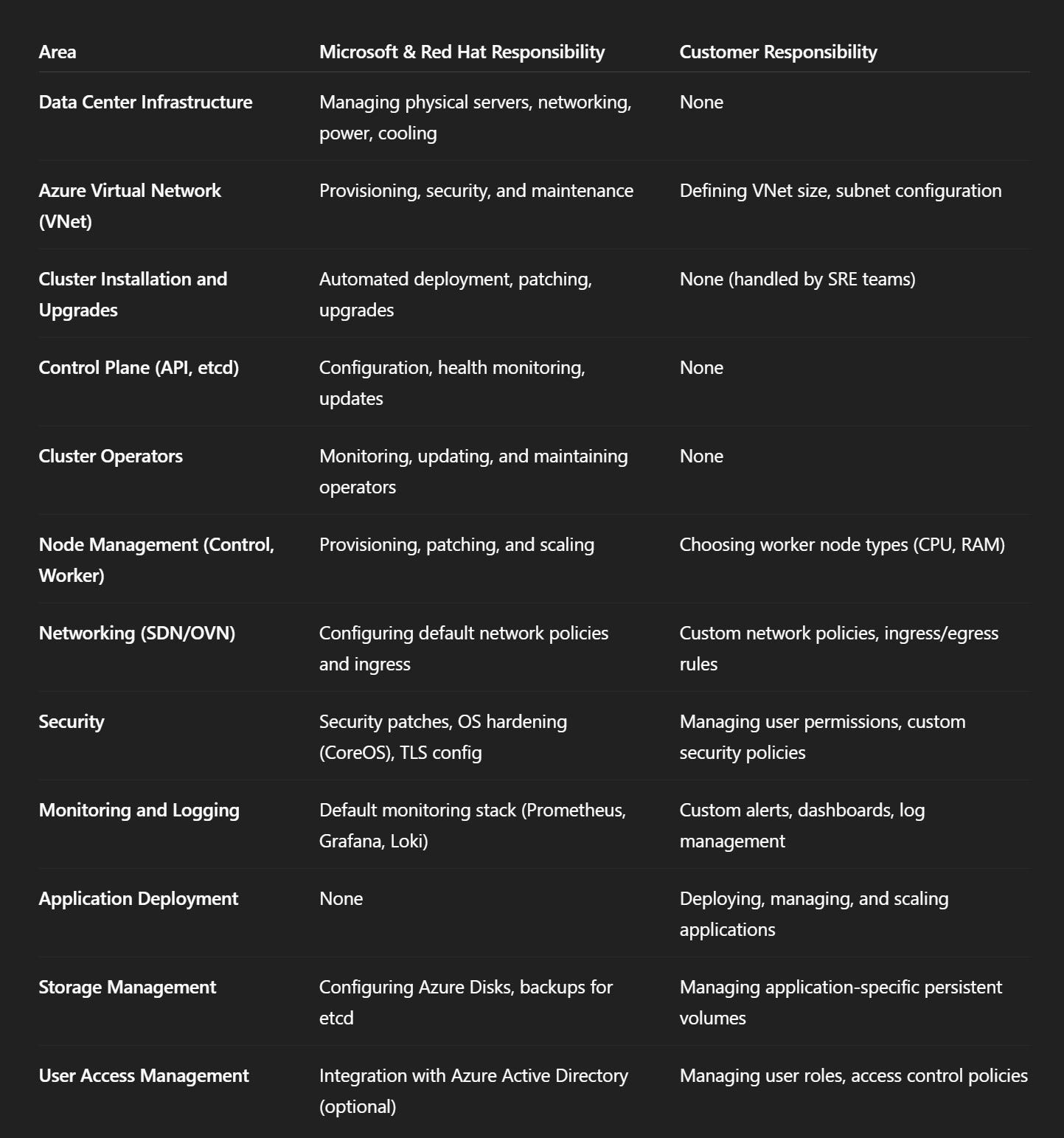
In simple terms, Microsoft and Red Hat keep the cluster running, while you manage your applications and configurations within it.
4. Authentication and Authorization in ARO
Authentication: Verifies who you are (Azure AD, GitHub, password).
Authorization: Verifies what you can do (roles and permissions).
Authentication
ARO supports multiple authentication methods:
- Entra ID/Azure Active Directory (AAD) (most common).
- Other Identity Providers: GitHub, GitLab, LDAP, or simple password files.
When using Entra ID/AAD, users authenticate via Entra ID, and ARO/Kubernetes APIs forward these authentication requests.
This ensures that user identities are verified before accessing the cluster.
Authorization
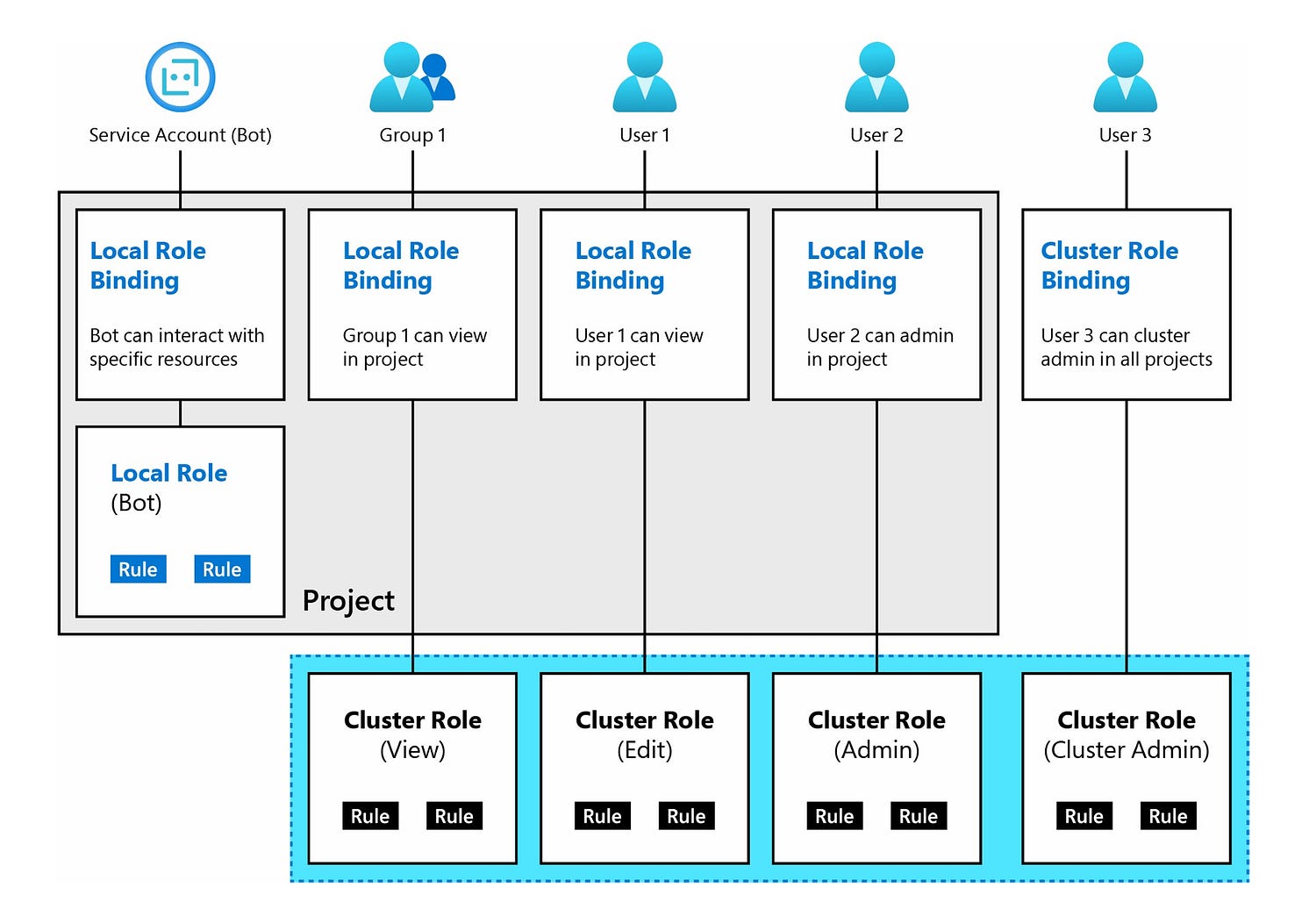
Managed by the ARO Policy Engine, which uses Role-Based Access Control (RBAC).
- Actions (like “create pod” or “list services”) are grouped into roles.
- Roles are assigned to users or groups using role bindings.
- When a user or service account makes a request, the policy engine checks if they have the appropriate role to perform the action.
NOTE: The Red Hat OpenShift documentation has a full list of authentication providers.
5. Support
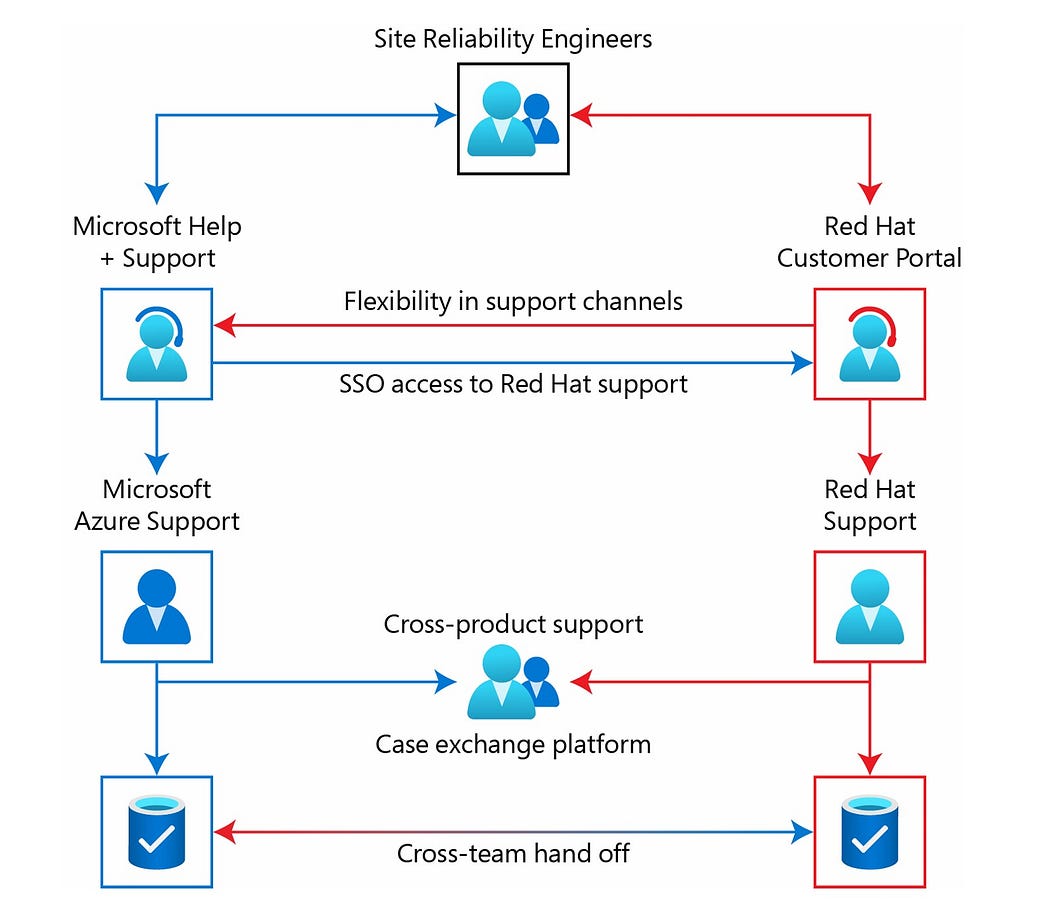
ARO support is a collaboration between Microsoft and Red Hat, backed by a global Site Reliability Engineering (SRE) team.
How to Request Support:
- Customers can open support tickets through either the Azure Support Portal or the Red Hat Support Portal (requires cluster registration in OpenShift Cluster Manager).
Collaborative Troubleshooting:
- Microsoft and Red Hat engineers can collaborate directly through a case exchange platform, with customer consent.
- Both support teams have access to the SRE team for advanced troubleshooting and repairs.
- Comprehensive Coverage: This model ensures fast, coordinated responses for issues at both the Azure platform and OpenShift cluster levels.
6. Pricing and Subscriptions
Billing Advantage of Azure Red Hat OpenShift (ARO) over DIY
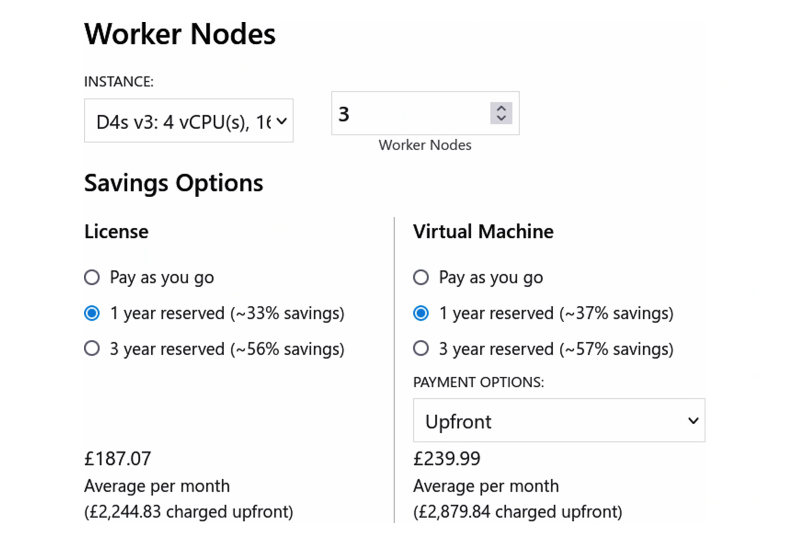
With Azure Red Hat OpenShift (ARO), all costs — including compute, network, storage, and OpenShift subscriptions — are consolidated into your Azure Subscription bill, making cost management simpler and more predictable.
- Unified Billing: No separate billing for Red Hat OpenShift licenses.
- Transparent Costs: Use the Azure Pricing Calculator to estimate ARO expenses easily.
- Simplified Management: All charges are visible in one Azure bill, eliminating the need to track multiple invoices.
Azure reserved virtual machine instances
Azure Reserved Virtual Machine Instances in Azure Red Hat OpenShift (ARO) are a way to pre-commit to using Azure Virtual Machines for 1 or 3 years, offering substantial cost savings.
- Ideal for long-running environments (like production ARO clusters), as they can reduce infrastructure costs significantly.
- Reserved instances only affect pricing — they do not change the architecture, performance, or service level of the ARO cluster.
- Even with reserved instances, you can still scale the cluster as needed.
7. Useful links
- MS ARO documentation: https://learn.microsoft.com/en-us/azure/openshift/
- ARO Roadmap: https://github.com/orgs/Azure/projects/701/views/1
- Red Hat ARO documentation: https://www.redhat.com/en/technologies/cloud-computing/openshift/azure/learn