Containerization. Ephemeral, Idempotent, and Immutable. Docker and containers.
1.Modern software development and IT operations. Containerization with dockers.
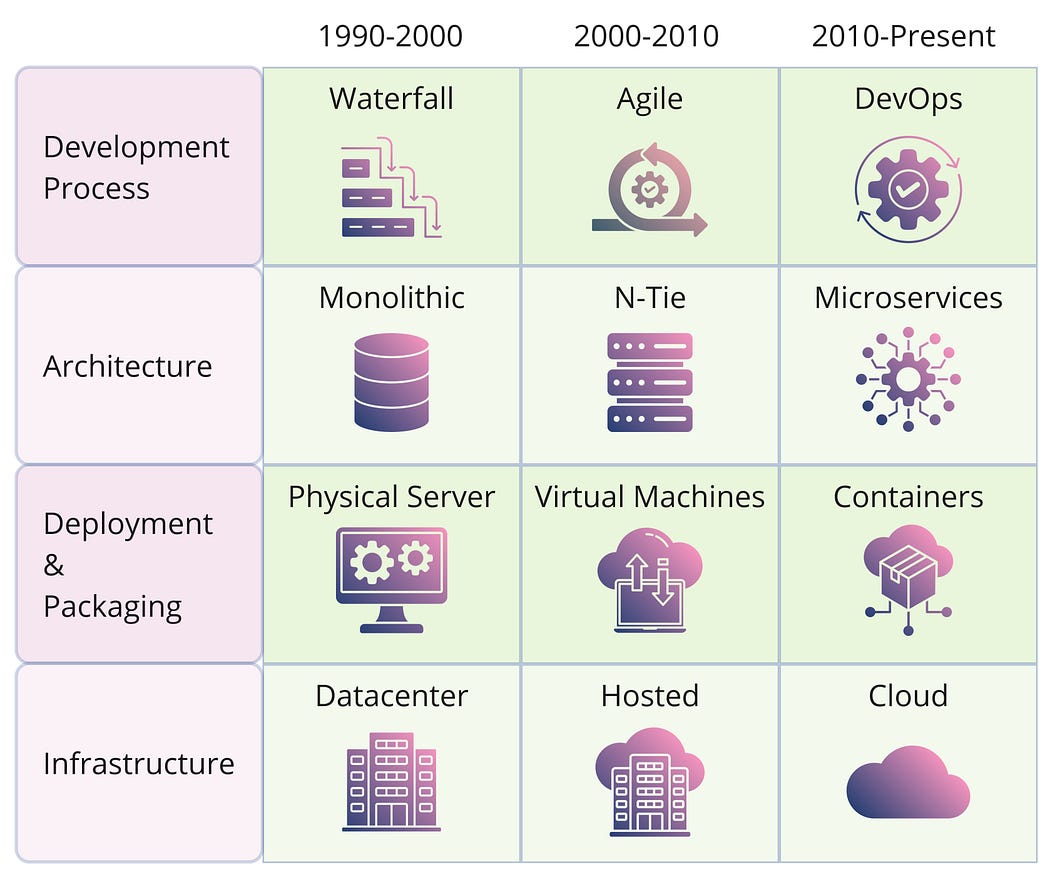
Cloud platforms and services form the essential infrastructure for DevOps and microservices, enabling the modern software development and IT operations ecosystem.
Before we get started, you might want to explore some related topics — they provide useful background that will help you get the most out of this post:
- 👉What are Microservices? Monolith vs Microservices architecture.
- 👉 The Cloud — what is it? Cloud services and platforms.
- 👉 What and Why — DevOps?
📺 Watch on YouTube: https://www.youtube.com/watch?v=JL3dHnlOZ8A&ab_channel=TelelinkBusinessServices
2. Introduction to Containers
Containerization is a modern approach to software development where an application, along with its dependencies and configuration, is packaged into a single unit called a container image. This container can be tested and deployed easily on any host operating system (OS).
A simple analogy = shipping containers
Think of software containers like shipping containers. Just as shipping containers can carry different types of goods by ship, train, or truck, software containers can hold different codes and dependencies. This makes it easy for developers and IT professionals to deploy applications across various environments with minimal changes.
Containers also help keep applications isolated from each other on a shared OS. They run on a container host, which operates on the OS (either Linux or Windows). Because of this, containers are much lighter than virtual machines (VMs).
Ephemeral, Idempotent, and Immutable
Containers provide all three Ephemeral, Idempotent, and Immutable properties to the applications and services they are hosting. In a local development or test environment, all those properties may look like the worst choice; however, on a large production scale, they provide the scale and agility.
Ephemeral = a short-lived process.
Idempotent = produces the same result no matter how many times it is performed.
Immutable = unchanging over time or unable to be changed.
Each container can run an entire web application or a service. For example, in a Docker setup, the Docker host is the container host, and applications like App1, App2, Svc1, and Svc2 are the containerized services.

- Ephemeral: Containers are designed to be short-lived and easily replaceable. This allows for rapid scaling, quick updates, and efficient resource utilization, as containers can be spun up and down as needed without long-term commitment.
- Idempotent: Operations on containers can be repeated multiple times without changing the outcome. This ensures consistency and reliability, especially in distributed systems where operations might be retried due to network issues.
- Immutable: Once a container is created, it does not change. Any updates or changes result in a new container being deployed. This leads to more predictable and stable environments, as the state of a container remains consistent throughout its lifecycle.
Advantages of Containerization
- Abstraction: Containers standardize applications, making them independent of the host system’s details.
- Scalability: Easily scale applications by running multiple containers.
- Dependency Management: Bundle applications with all dependencies, simplifying version management.
- Fault Tolerance: Isolate failures to individual containers, enhancing resilience.
- Security: Isolate applications to prevent malicious code from spreading.
- Resource Efficiency: Share common layers to save disk space.
- Consistency: Use Docker files for predictable and repeatable deployments.
Containerization Use Cases
- Microservices Deployment: Isolated environments for each service, enabling independent scaling and management. You may read more about Microservices in my blog post: https://medium.com/@h.stoychev87/what-are-microservices-1e1e588e3508
- CI/CD Pipeline Optimization: Consistent environments across development, testing, and production stages.
- Application Modernization: Easier deployment and management of legacy applications in cloud-native environments.
- Development and Testing: Reproducible environments that mirror production settings.
- Edge Computing: Running applications closer to the data source for reduced latency.
- Batch and Data Processing: Efficient execution of large-scale data tasks with horizontal scaling.
- PaaS Solutions: Simplified application development and management without infrastructure complexities.
Summary
A container is a standard software unit that bundles code and all its dependencies, ensuring the application runs quickly and reliably across different computing environments. A Docker container image is a lightweight, standalone, executable package that includes everything needed to run an application: code, runtime, system tools, libraries, and settings.
Containers provide isolation, portability, agility, scalability, and control throughout the entire application lifecycle. The most significant benefit is the isolation between development (Dev) and operations/production (Ops/Prod) environments.
3. Containers VS Virtual Machines
Virtual machines (VMs) = hardware level
VMs are like creating multiple computers from one physical machine. A special software called a hypervisor lets several VMs run on a single server. Each VM has its own operating system, applications, and all the necessary files, which can take up a lot of space (tens of gigabytes). VMs can also take a while to start up.

Virtual Machines Architecture
- Hardware Layer: This is the foundation, including the CPU, storage, and network interfaces.
- Host OS and Hypervisor: Above the hardware is the host operating system and a hypervisor, which manages the virtual machines.
- Virtual Machines (VMs): Each VM includes its own operating system, applications, and necessary files, running as if it were a separate physical machine.
- Applications and Data: Inside each VM, you’ll find the applications and data, isolated from other VMs on the same host.
Containers
Containers are a way to bundle an application and its dependencies together. They run on the same machine and share the operating system’s kernel, but each container operates in its own isolated space. Containers are much smaller than virtual machines (usually just tens of megabytes), can run more applications, and need fewer virtual machines and operating systems (abstraction layers).

Container Architecture = OS level
- Hardware Layer: This is the foundation, including the CPU, storage, and network interfaces.
- Host OS and Kernel: The host operating system and its kernel are above the hardware, which manages interactions between software and hardware.
- Container Engine: This layer, specific to the container technology, runs on the host OS.
- Containers: At the top are the containers, each containing the necessary binaries, libraries, and applications, all running in their own isolated user space.
4. Docker
Overview
Docker is a company famous for creating a container platform (Docker) for developing, shipping, and running applications using container technology.
Evolution of Containerization
Containerization started with Linux groups, which manage and limit resource usage, and Linux containers (LXC), which provide isolation for different processes. LXC containers include the necessary binaries and libraries for applications but don’t package the OS kernel, making them lightweight and able to run many instances on limited hardware.
Docker containers
Docker, built on LXC, made container management popular and helped create the Open Container Initiative (OCI) specifications. These standards ensure that container images and runtimes are consistent across different environments, supporting cross-platform compatibility, which is crucial for modern digital workspaces.
When you run a Docker container image on Docker Engine, it becomes a container. Containers work on both Linux and Windows-based applications and will always run the same way, no matter the underlying infrastructure. They isolate software from its environment, ensuring consistent performance despite differences between development and staging environments.
Docker terminology and lifecycle
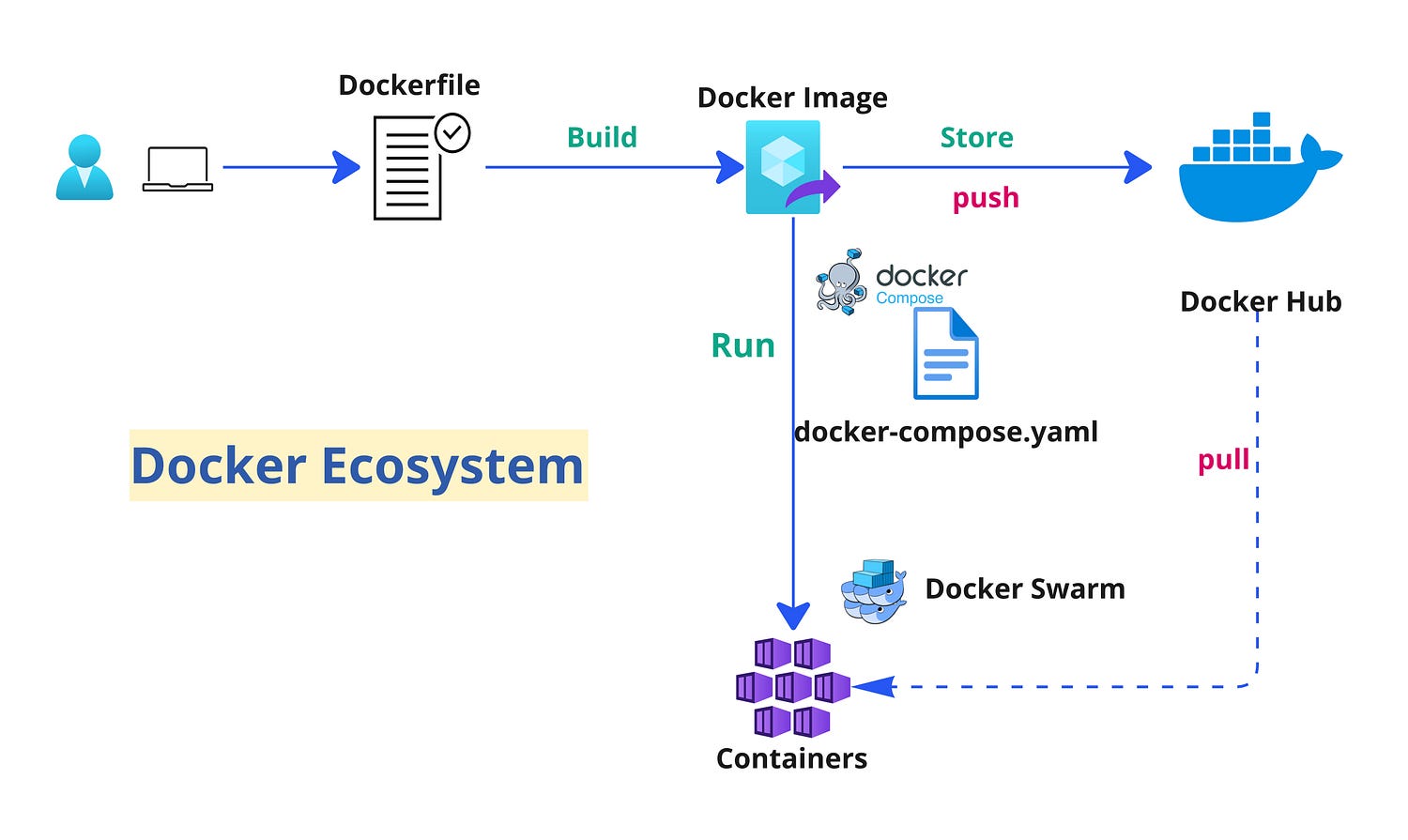
Dockerfile: A Dockerfile is a text file with instructions for building a Docker image. Think of it like a recipe: the first line specifies the base image, and the following lines include steps to install programs, copy files, and set up the environment.
# syntax=docker/dockerfile:1

FROM node:lts-alpine
WORKDIR /app
COPY . .
RUN yarn install --production
CMD ["node", "src/index.js"]
EXPOSE 3000
Build: Building is the process of creating a container image based on the Dockerfile and additional files in the build directory.
Container Image: A container image is a package that includes everything needed to create a container. It contains all the dependencies (like frameworks) and the configuration for deployment and execution. Typically, an image is built from multiple base images stacked together to form the container’s filesystem. Once created, an image cannot be changed.
Container: A container is an instance of a Docker image, representing the execution of a single application, process, or service. It includes the contents of a Docker image, an execution environment, and a standard set of instructions.
Volumes(storage): Volumes provide a writable filesystem for containers. Since images are read-only (Stateless) but most programs need to write data, volumes add a writable layer on top of the container image. This way, programs can write to the filesystem as usual. Volumes are stored on the host system and managed by Docker.
Networking — Most common network types in Docker are:
- Bridge Network: When you create a container without specifying a network driver, it uses the default bridge network. This means the container will be part of a private internal network on your Docker host.
- Host Network: In this mode, containers share the host’s network stack. They don’t get their own IP addresses but use the host’s IP address, which removes the network isolation between the Docker host and the containers.
- Overlay Network: This network type allows containers running on different Docker hosts to communicate with each other. It’s commonly used in Docker Swarm to connect services across multiple hosts.
Tag: A tag is a label you can apply to images to identify different versions or variants of the same image, based on version number or target environment.
Multi-stage Build: This feature, available since Docker 17.05, helps reduce the size of final images. For example, you can use a large base image with the SDK for compiling and publishing, and then a smaller runtime-only base image to host the application.
Container Registry: A registry is a service that provides access to repositories. The default registry for most public images is Docker Hub, owned by Docker. Registries usually contain repositories from multiple teams. Companies often have private registries to store and manage their own images. Common registries include Docker Hub, Amazon ECR, and Azure Container Registry.
Repository (repo): A repository is a collection of related Docker images, labeled with tags to indicate image versions. Some repos contain multiple variants of a specific image, such as one with SDKs (heavier) and another with only runtimes (lighter). These variants can be marked with tags. A single repo can also contain platform variants, like a Linux image and a Windows image.

Docker Hub: Docker Hub is a public registry where you can upload and work with Docker images.
Azure Container Registry: This is a public resource for working with Docker images in Azure. It provides a registry close to your Azure deployments and allows you to control access using Azure Active Directory groups and permissions.
Docker Trusted Registry (DTR): DTR is a Docker registry service that can be installed on-premises within an organization’s data center and network. It’s useful for managing private images within an enterprise and is included in the Docker Datacenter product.
Multi-arch Image: Multi-architecture (or multi-platform) images are a Docker feature that simplifies selecting the right image for the platform Docker is running on. For example, when a Dockerfile requests a base image like mcr.microsoft.com/dotnet/sdk:8.0, it automatically selects the appropriate version for the operating system and version.
Docker Desktop: Docker Desktop provides development tools for Windows and macOS to build, run, and test containers locally. It supports both Linux and Windows Containers.
Compose: Docker Compose is a command-line tool and YAML file format for defining and running multi-container applications. You define an application with multiple images using .yml files, and then deploy the entire application with a single command (docker-compose up).
Cluster: A cluster is a collection of Docker hosts that appear as a single virtual Docker host. This allows applications to scale across multiple hosts. Docker clusters can be created with tools like Kubernetes, Docker Swarm, etc.
Orchestrator: An orchestrator simplifies the management of clusters and Docker hosts. It allows you to manage images, containers, and hosts through a command-line interface (CLI) or graphical UI. Orchestrators handle container networking, configurations, load balancing, service discovery, high availability, and more. The best example is Kubernetes.
5. Other container technologies
Docker, as a full container platform, is not the only available choice. Docker has many alternatives available, offering various features and capabilities for containerization.
Here is a list of technologies by category with other alternatives to the Docker platform, including runtime engines, orchestrator platforms, container builds, etc.: https://medium.com/@h.stoychev87/devops-tools-by-categories-for-2025-62958669adb8